
By: Kyle Newton
The instant availability, scalability, and flexibility of cloud resources are massive benefits to those working in the cloud space, but this ease of access can also lead to major cost inefficiencies for those who may not know all the ins and outs and how services interact with one another. One of the most common, yet lesser-known, financial drains in AWS is with Elastic Block Store (EBS) Volumes.
Organizations of all sizes face unexpected costs from issues like unattached or underutilized volumes, poor snapshot management, and incorrect volume type selections. However, a particularly costly mistake is overprovisioning Input/Output Operations Per Second (IOPS), which is assigning more provisioned IOPS to a volume than its attached instance can handle. This results in paying for performance you never use.
In this blog, we’ll explore the key elements of AWS EBS volumes and show you how to identify and avoid this expensive pitfall.
IOPS vs. Throughput: Key Metrics for AWS EBS Optimization
To master AWS IOPS optimization, it’s essential to understand two foundational metrics: IOPS and Throughput.
IOPS: This measures how many read and write operations a storage device can perform each second. It’s crucial for workloads with frequent, small, and random I/O actions, like transactional databases.
Throughput: This measures how much data can be transferred per second, usually in megabytes (MiB.s). It’s vital for applications that handle large, sequential data streams, such as big data analytics or video processing.
Choosing the right volume depends on balancing these two metrics to meet your application’s unique demands.
AWS EBS Volume Types: A Quick Comparison
AWS offers several EBS volume types, each designed for different use cases and performance profiles. Understanding their differences is the first step toward achieving significant EBS volume cost savings:
- sc1: Magnetic, Ultra Low Cost, medium throughput (250MiB/s) and very low IOPS (250 @ 1 MiB I/O)
- st1: Magnetic, Low cost, high throughput (500MiB/s) and low IOPS (500 @ 1MiB I/O)
- gp2: SSD, average cost, medium throughput based on size (128-250MiB/s). IOPS based on size, with a minimum baseline of 100, and a maximum of 16K. (3IOPS/GB)
- For example, a 3TB gp2 volume would have a baseline of 9K IOPS.
- gp3: SSD, average cost, High Throughput available (125MiB/s base, up to 1,000MiB/s). IOPS based on provisioning, with a minimum baseline of 3K and a maximum of 16K.
- io1: High-performance SSD, High cost, High throughput (up to 1,000MiB/s) high IOPS (Up to 64,000 @ 16KiB)
- io2: High-performance SSD, High cost, High throughput (up to 1,000MiB/s) high IOPS (Up to 64,000 @ 16KiB)
- 0.001% annual failure rate, as opposed to all other volumes which are 0.1-0.2% annual failure rate.
Many teams default to io1 volumes when they are unaware of the baseline IOPS offered by gp2 or the flexible performance of gp3. With gp3, you can provision throughput and IOPS independently, offering a powerful tool for right-sizing your environment without overpaying. We encourage teams currently using io1 or io2 to retest their workloads with gp3, especially if performance data shows underutilization.
When to Choose io1 or io2 Volumes Over gp3
While gp3 is a game-changer for many, certain scenarios genuinely demand the power of io1 or io2 volumes. These are typically driven by two primary needs:
- Extreme IOPS Requirements: If your application requires more than the 16,000 IOPS that gp3 can provide, io1 or io2 become necessary.
- Ultra-Low Latency and High Availability: While gp2 and gp3 volumes are designed to deliver provisioned performance 99% of the time, io1 and io2 are engineered for 99.9% consistency. For systems where even the slightest performance dip is unacceptable—such as critical life-monitoring applications—this higher level of reliability is non-negotiable.
The Hidden Costs of Overprovisioned IOPS on AWS
When high-performance io1 or io2 volumes are essential, the risk of overprovisioning becomes a major concern. The problem arises when these powerful volumes are attached to EC2 instances that cannot support the provisioned IOPS level. Not all instances are the same; an older instance family may have a much lower IOPS limit than a modern one. In these situations where IOPS are critical or need to be higher than 16K, that’s where overprovisioning can happen and often does. We want to be mindful of the instance type we are attaching these io1 and io2 volumes to avoid this. Not all instances can handle 16K IOPS, and even less can handle the 64K IOPS possible in these volumes.
For example, a c4.2xlarge can only support 8,000 IOPS (16KiB I/O), while a newer c5.large can support up to 20,000 IOPS (16KiB I/O). If you attach a volume provisioned for 16,000 IOPS to that c4.2xlarge instance, you are paying double the performance you can ever achieve. Those extra IOPS are completely wasted, providing zero performance benefit while inflating your AWS bill. Working toward having instances updated to the latest family can go a long way toward having enough IOPS. Even when using latest generation instances, you may find cases where your IOPS are lower than necessary.
We partnered with one client who had a large number of io1 volumes attached to undersized instances. Below is a 4-month cost trend of Provisioned IOPS (PIOPS) storage costs once we identified and worked with their team to utilize the right-sized instances and volume types for their needs.
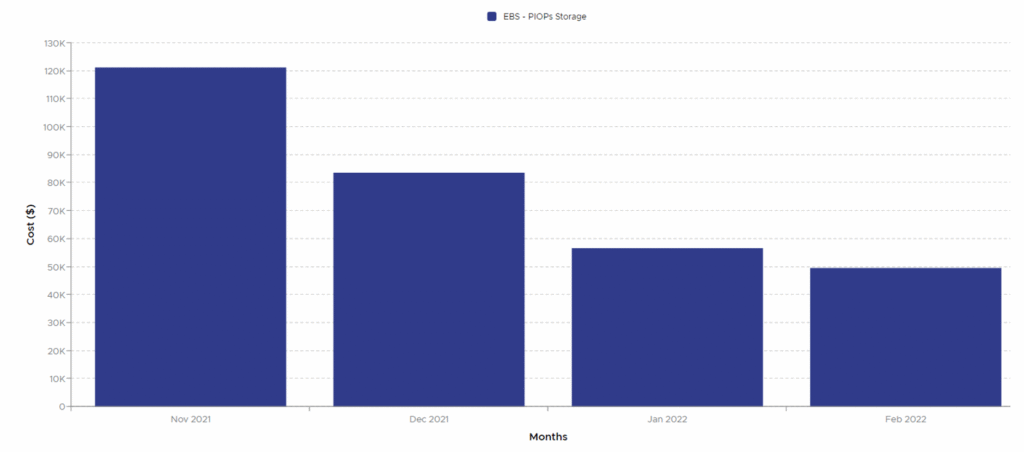
As seen in the chart, we helped them cut their PIOPS storage costs by more than half, amounting to $70,000 per month in savings after just three months of collaborative cleanup.
How to Optimize Your AWS EBS Volumes
Identifying these inefficiencies requires a data-driven approach. Below is a snippet of data that we collected, processed, and analyzed from the customer’s environment that helped identify potential instances to upgrade or PIOPS volumes to downgrade. The first three columns are the sum of PIOPS, GB, and Cost. Then shown are the number of volumes attached, the instance type and its maximum supported IOPS, and finally the percentage of total PIOPS to MAX IOPS supported.
Kyle Newton is a Cloud FinOps Engineer with Pellera.