By: Alex Williams
Unlocking the full potential of IoT requires more than powerful hardware—it demands strong security. Advantech, a global leader in industrial computing and IoT solutions with $2 billion in annual revenue, powers industries like smart manufacturing and healthcare IT through advanced industrial PCs, embedded systems, and edge computing platforms. Organizations rely on Advantech WISE-DeviceOn, an Internet of Things (IoT) management platform that enables seamless monitoring of Windows and Ubuntu agents through a web application.
In October 2025, Pellera security researchers responsibly disclosed 11 vulnerabilities discovered in Advantech WISE-DeviceOn V5.3.12. These findings were publicly disclosed in December 2025. This article breaks down the most critical vulnerability, CVE-2025-34256.
DeviceOn’s Authentication System
WISE-DeviceOn uses JSON Web Tokens (JWT) for its authorization system. JWTs are an authorization and information exchange system that can be used as an alternative to standard cookies. JWTs use the following format:
eyJ0eXAiOiJKV1QiLA0KICJhbGciOiJIUzI1NiJ9.
eyJpc3MiOiJqb2UiLA0KICJleHAiOjEzMDA4MTkzODAsDQogImh0dHA6Ly9leGFtcGxlLmNvbS9pc19yb290Ijp0cnVlfQ.
dBjftJeZ4CVP-mB92K27uhbUJU1p1r_wW1gFWFOEjXk
JWTs consists of three sections separated by periods: header, payload, and signature. Each section is Base64-encoded. The previous JWT can be decoded into the following:
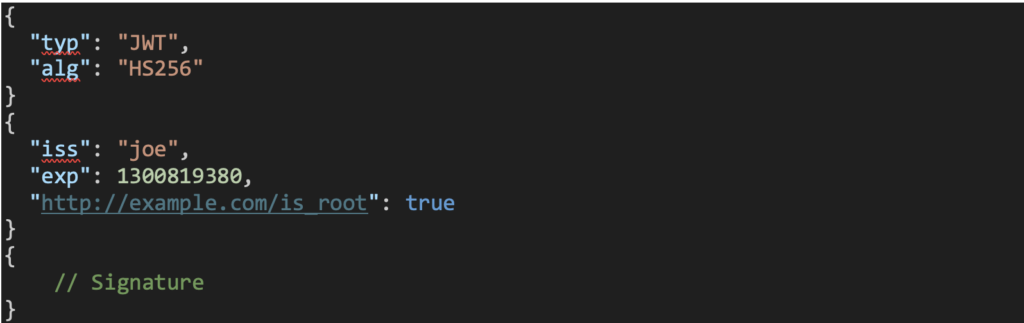
More information on JWTs can be found in the JSON Web Token open standard, RFC 7519.
When a user attempts to log in to DeviceOn, the client issues an HTTP GET request to the endpoint “/rmm/v1/accounts/login”. This request includes an Authentication Basic HTTP header that contains the attempted username and password. If the credentials are valid, then the server responds by issuing a signed JWT. This token is returned to the client and stored in the HTTP cookie EIRMMToken. The JWT is subsequently used to authenticate and authorize the user for future requests. An example DeviceOn JWT token is shown below:
eyJ0eXAiOiJKV1QiLCJhbGciOiJIUzUxMiJ9.eyJuYW1lIjoicm9vdCIsImV4cCI6MTc1ODgzNjk3NCwibG9naW4 iOiIyMDI1LTA5LTI1IDE1OjQ5OjM0ICgtMDUwMCkiLCJpYXQiOjE3NTg4MzMzNzQsImVtYWlsIjoicm9vdEBhZHZ hbnRlY2guY29tLnR3In0.x17OI5xPWSUe6HNU5B7W5U6eam5rYH2Iaj9CeFPwJD5_FcGDi8ForP2vwC0DQZhw0dVA7fSoMrBK7XAB1bTAA
Which can be Base64-decoded into the following sections:
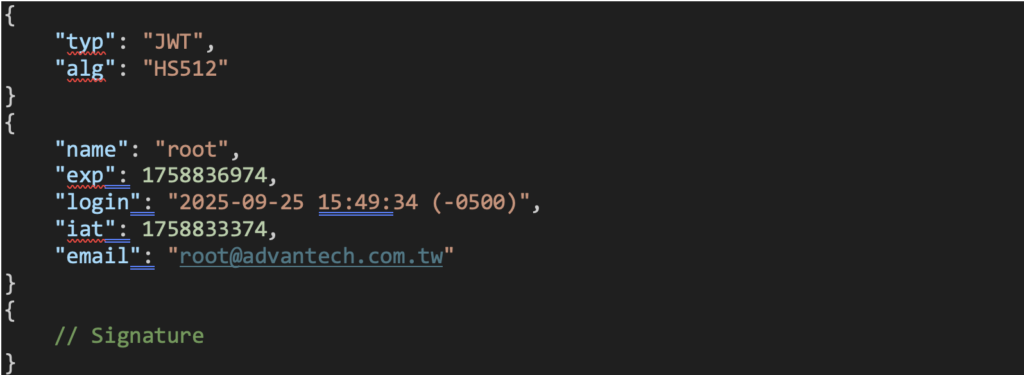
The name of the logged in account is stored in the value of the JSON key name, and the email associated with the account is stored in the value of the JSON key email. Note that when a user logs into the web application, the email is used as the account’s username.
JWT EIRMMToken Use of Hard-coded Cryptographic Key (CVE- 2025-34256)
Our researchers found that the following Java class, server\portal\WEB-INF\lib\RMMLib.jar!com.utils.AuthUtil, is responsible for the authentication and authorization process:
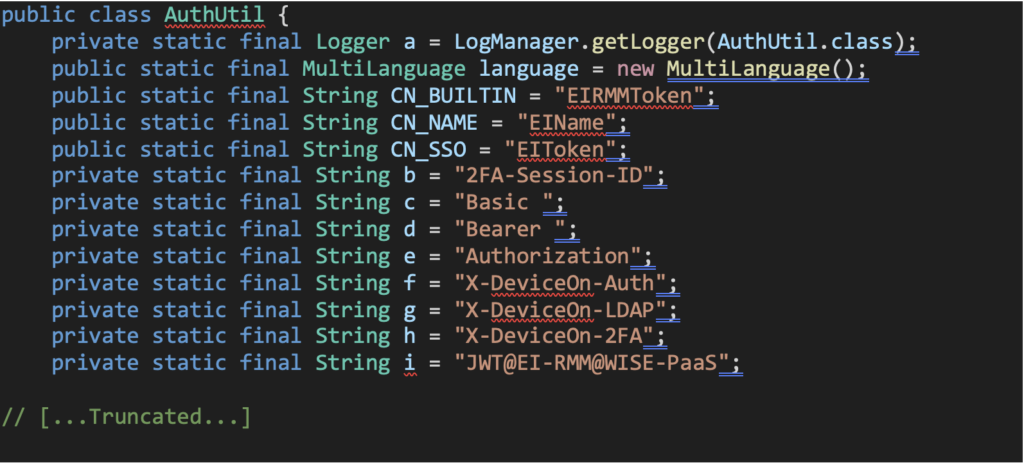
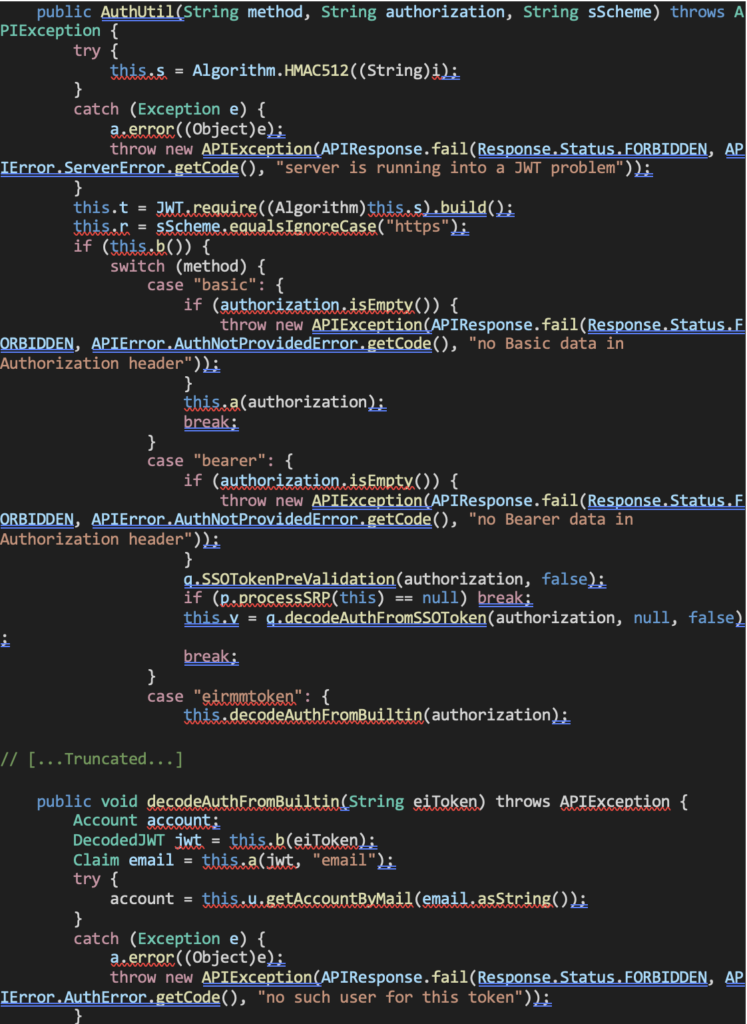

During our research we discovered that WISE-DeviceOn uses a hardcoded key to sign the secret for every JWT (this was confirmed on another installation of the product on a different machine). The hardcoded key used is “JWT@EI-RMM@WISE-PaaS” [1]:

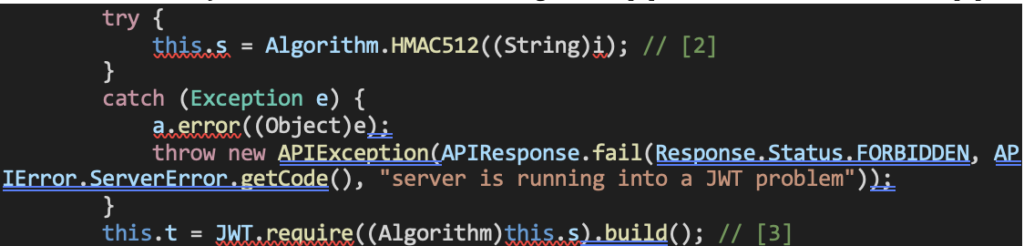
This hardcoded key is then used to create the algorithm [2] and the verifier of the JWT [3]:
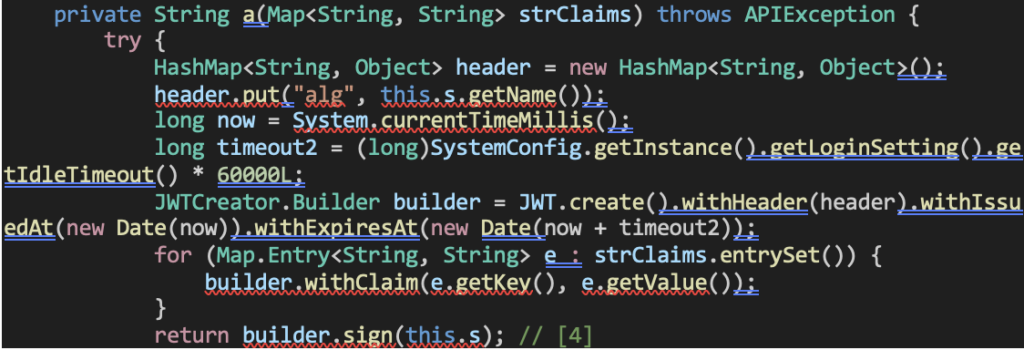
This can be seen later after the login process was successful that the same algorithm is used to sign the user’s new JWT [4]:
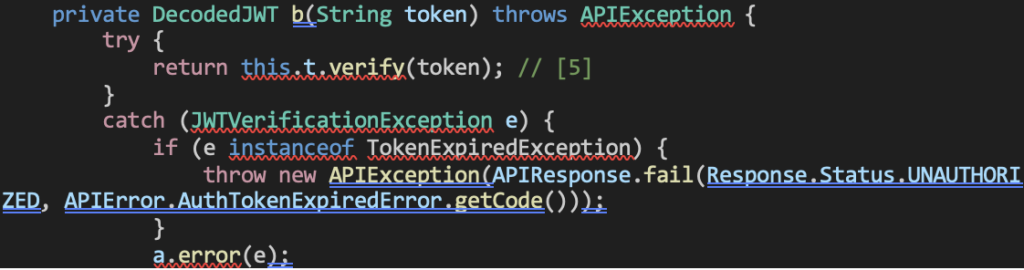
When a user sends an HTTP request with the JWT EIRMMToken included in the HTTP Cookie header, the following function is used to verify the JWT using the verifier that was built using the hardcoded key [5]:

After the JWT is successfully verified, the email claim’s value in the JWT is retrieved [6] and evaluated to ensure the associated email address is for a valid account [7]. If it is, then the user is successfully authenticated [8]:
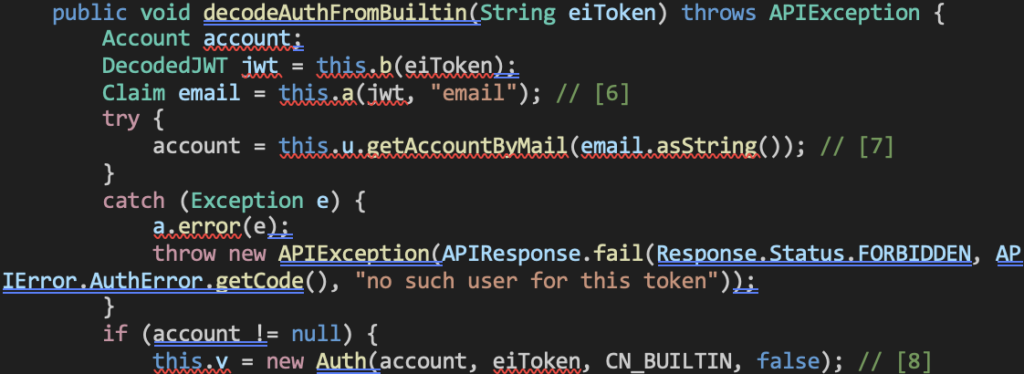
The only JWT field that is ensured to be valid is the JWT claim email field. As a result, if an attacker can determine the email address associated with a victim’s account, they can forge a valid JWT by signing it with the hardcoded secret key. This allows the attacker to impersonate the victim and perform any actions permitted to that account.
An additional factor that significantly reduces the attack complexity is the format requirement for the Super Administrator account. The email address associated with this account must begin with the prefix root@, which substantially narrows the search space for brute-force or guess-based attacks.
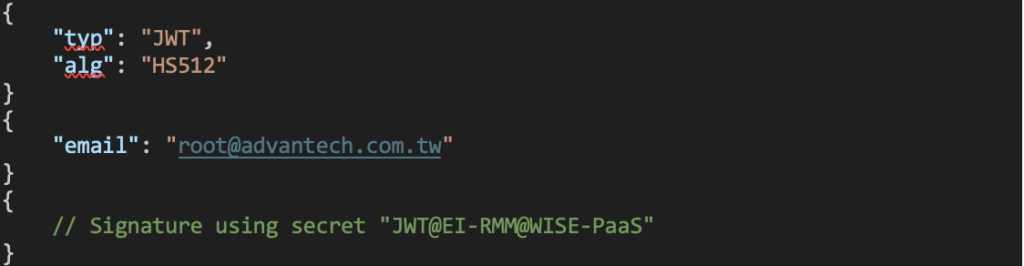
For example, a JWT forged for a Super Administrator account with the email address [email protected] is accepted by the application: eyJ0eXAiOiJKV1QiLCJhbGciOiJIUzUxMiJ9.eyJlbWFpbCI6InJvb3RAYWR2YW50ZWNoLmNvbS50dyJ9.Qmxiuu v5iWF85NAd3MFbHAL1iUelN92-tELt8FCpfptnR_GEkZqVk3lLAM19NlP0UidZv0eD59h0OMj42mLmoQ
Which can be Base64-decoded to the following:
After Bypassing Authentication
If the attacker can guess, or brute force, the email associated with the “Super admin” account (which again is the email that must begin with “root@”) and create a JWT signed with the hardcoded key, the attacker can abuse the following capabilities:
- Change all server settings including backup and recovery locations (which can be remote servers), server certificates, disable two-factor authentication, etc.
- Add any additional accounts with any permissions.
- Directly execute arbitrary code on any connected Agent’s device via the Device > Remote Control > Launch Terminal option.
- Mass execute arbitrary code on any connected Agent devices by uploading malicious apps via the Application > Repositories > Upload option.
Proof of Concept
The proof of concept above performs the following actions:
- Creates and signs a JWT using the hardcoded secret.
- Sends an HTTP POST request to upload a malicious application which will be installed on all connected Windows agents.
- Sends an HTTP GET request to retrieve the list of connected Windows agents.
- Sends an HTTP POST request to install and execute the previously uploaded malicious application to all connected Windows agents.
- This malicious application will execute the commands “whoami > C:\RCE_OUTPUT.txt” and “calc.exe”.
Mitigations
Advantech has released an advisory addressing these vulnerabilities. They have also released a patched version that fixes these vulnerabilities.
Timeline
- October 10, 2025 – Pellera reports the 11 vulnerabilities found to VulnCheck to work as an intermediary between Pellera and Advantech. VulnCheck responds that Advantech has been contacted about the vulnerabilities.
- October 21, 2025 – VulnCheck states that Advantech has requested the PoC files (which could not be included in the initial report to VulnCheck). Pellera sends the PoCs to Advantech via OneDrive.
- October 28-29, 2025 – Advantech requests, via VulnCheck, additional information about the vulnerabilities and cross-site scripting vulnerabilities. Pellera responds.
- November 4, 2025 – Advantech provides, via VulnCheck, a cloud instance running the patched version to ensure that the vulnerabilities have been patched. Pellera responds that all vulnerabilities are confirmed to be patched.
- December 5, 2025 – VulnCheck assigns the following CVEs to the vulnerabilities: CVE-2025-34256, CVE-2025-34257, CVE-2025-34258, CVE-2025-34259, CVE-2025-34260, CVE-2025-34261, CVE-2025-34262, CVE-2025-34263, CVE-2025-34264, CVE-2025-34265, and CVE-2025-34266.
Protect Your Systems
Vulnerabilities like those found in Advantech WISE-DeviceOn highlight how quickly threat actors can capitalize on overlooked systems. Our security experts perform in-depth Advanced Threat Assessments designed to give you clear visibility into your attack surface and actionable remediation guidance.
Understand your exposure before it gets exploited. Get in touch to learn how our assessments can strengthen your security posture.

Alex Williams is an Offensive Security Researcher at Pellera.